What an open-source subtitle editor is and who uses it
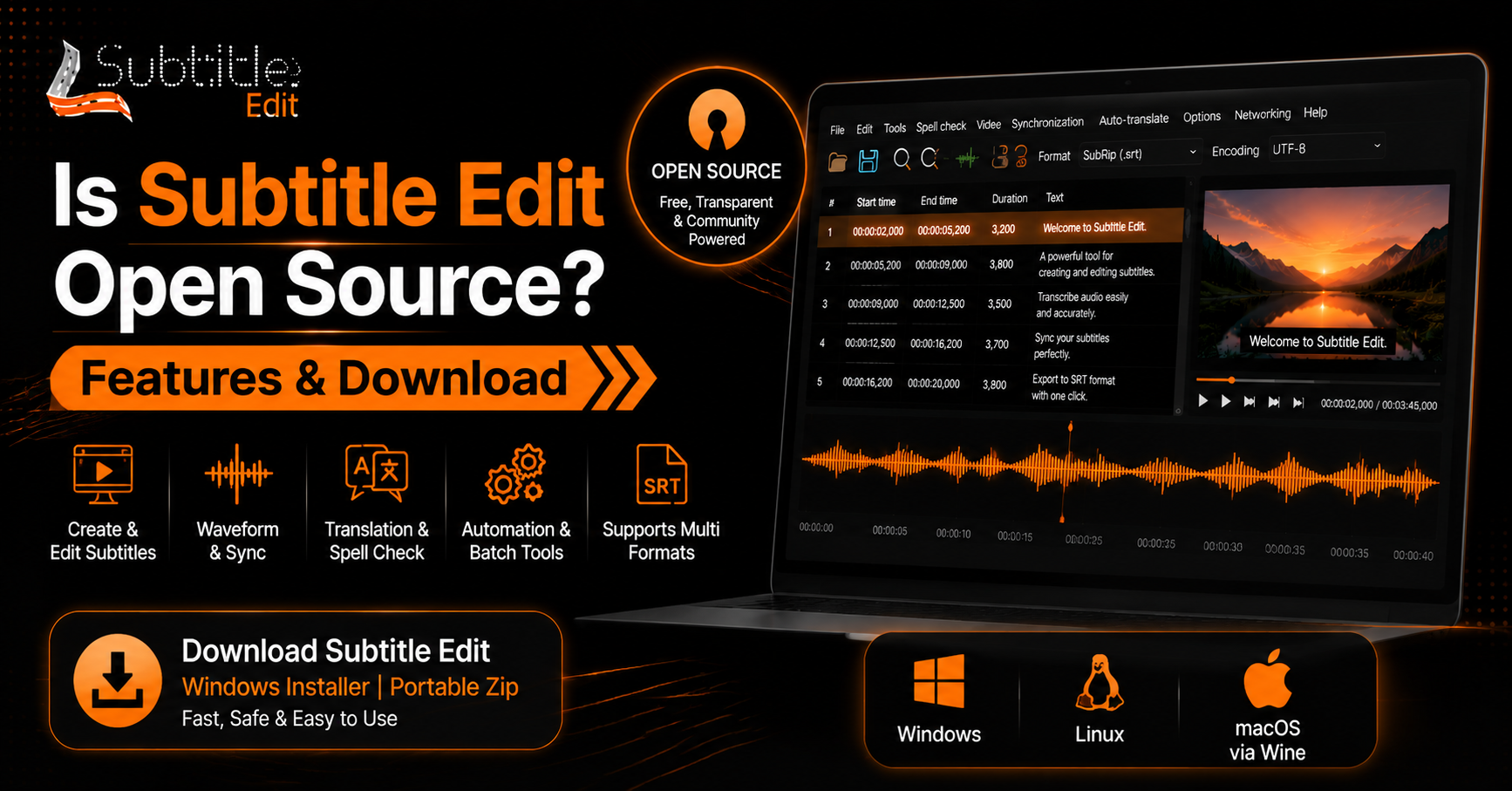
An open-source subtitle editor is a tool whose source code is publicly available, allowing developers and users to view, modify, and improve the software. These editors are commonly used for creating, editing, syncing, and managing subtitle files.
They are popular among video creators, translators, developers, and organizations that need flexible subtitle solutions. Open-source editors offer greater control, customization options, and community-driven improvements than many closed-source alternatives.
Core features to expect
Open-source subtitle editors usually include essential tools for creating, editing, and managing subtitle files. They are designed to give users more control over subtitle workflows, from basic text changes to detailed timing adjustments.
Features may vary between tools, but most reliable editors provide options for synchronization, formatting, file conversion, and subtitle quality improvements.
Timecode editing and fine timing controls
Timecode editing allows users to control the exact start and end time of each subtitle line. This helps maintain proper synchronization between spoken dialogue and displayed text.
Fine-timing controls are useful for adjusting subtitle delays, shortening display durations, and fixing small timing errors. These features are especially important for long videos where accurate subtitle placement improves readability.
Timeline, waveform and visual sync tools
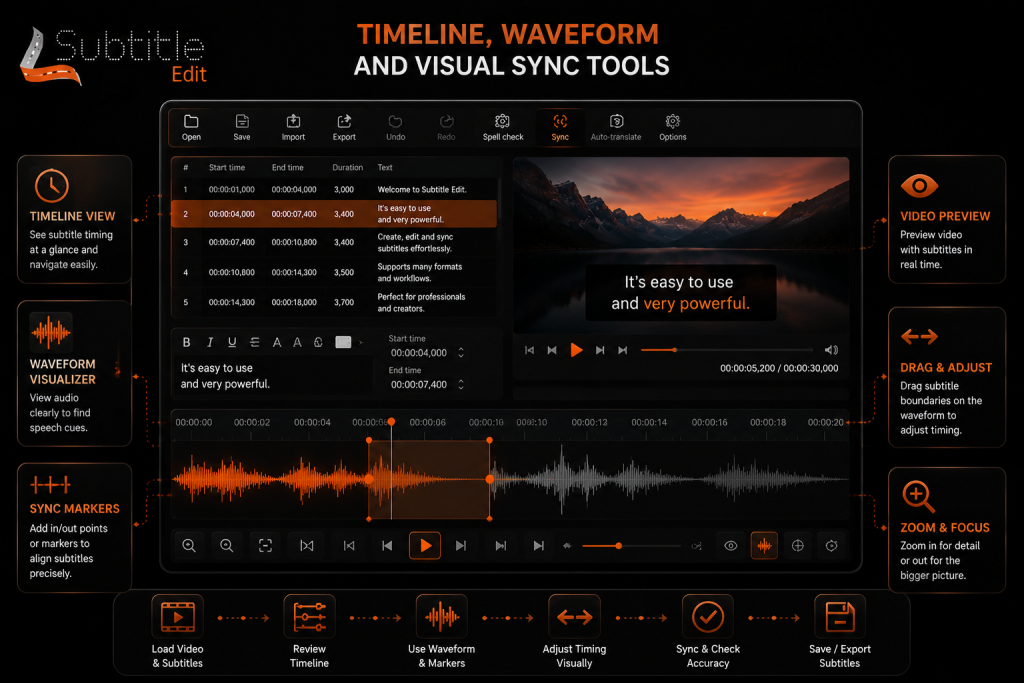
Timeline and waveform tools help users match subtitles with the exact timing of spoken audio. The visual display of audio waves makes it easier to identify pauses, changes in dialogue, and key sound points.
These tools improve subtitle accuracy by allowing users to place captions exactly where they belong. They are especially useful for long videos, interviews, and content with multiple speakers.
Playback, preview and scrub controls
Playback and preview controls allow users to watch the video while editing subtitles in real time. Users can check subtitle timing, text placement, and synchronization without exporting the file first.
Scrub controls make it easier to move quickly through different parts of a video and review specific sections. These features help speed up editing and reduce timing errors during subtitle creation.
Automatic transcription and speech-to-text support
Automatic transcription uses speech-to-text technology to convert spoken audio into subtitle text. This feature helps users create captions faster by reducing the need for manual typing.
Speech recognition tools can generate an initial subtitle draft that users can review and edit for accuracy. They are useful for interviews, tutorials, lectures, and other spoken content.
Retiming, shifting, splitting and merging subtitles
Retiming tools allow users to adjust subtitle timing when captions appear too early or too late. Users can shift subtitle ranges, change display duration, and synchronize text with audio more accurately.
Splitting and merging options help organize subtitle lines for better readability. Long captions can be divided into smaller sections, while related lines can be combined to create a smoother viewing experience.
Batch operations, format import/export and round-trip support
Batch operation tools allow users to apply changes to multiple subtitle files or sections at the same time. This helps save time when working on large projects or managing multiple language versions.
Import and export support allows subtitle editors to work with different file formats while maintaining timing and formatting. Round-trip support ensures files can move between different editing tools without losing important subtitle data.
Undo/history, project management and file recovery
Undo and history features allow users to reverse changes and restore previous editing steps. These tools are useful when making complex adjustments and help prevent accidental data loss.
Project management features help organize subtitle files, versions, and related media projects. File recovery options provide additional protection by helping users restore work after unexpected errors or interruptions.
Keyboard shortcuts and customizable workflows
Keyboard shortcuts help users complete common subtitle-editing tasks faster without repeatedly navigating menus. Actions like moving between subtitle lines, adjusting timing, and playing previews can be controlled more efficiently.
Customizable workflows allow users to configure the editor to their preferences. These options are useful for professional editors who need a faster, more consistent subtitle-creation process.
Supported subtitle formats, containers and platform compatibility
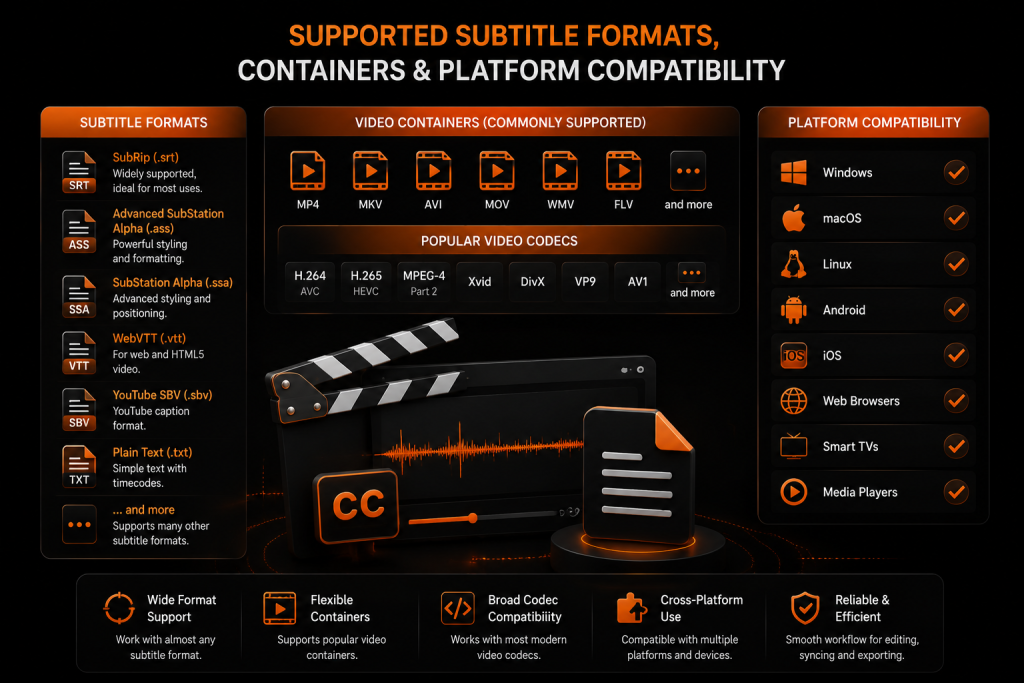
Open-source subtitle editors usually support common formats such as SRT, VTT, ASS, and other caption file types. This flexibility allows users to create subtitles for different video platforms and media players.
Compatibility with video containers and platforms ensures subtitles work correctly across different systems. Proper format support helps maintain timing, text styling, and language information when moving files between editing tools, players, and publishing platforms.
Common subtitle formats (SRT, VTT, ASS/SSA, SUB, etc.)
Subtitle editors support various file formats to ensure compatibility with different video platforms and media players. SRT is one of the most widely used formats because it is simple, lightweight, and supported by most applications.
Formats like VTT are commonly used for web videos, while ASS and SSA support advanced styling options such as fonts, colors, and positioning. SUB formats are also used in some media workflows that require basic subtitle support.
Container and codec compatibility (MP4, MKV, AVI) and ffmpeg integration
Subtitle compatibility depends on both the video container and the tools used to process media files. Common containers like MP4, MKV, and AVI can store video, audio, and subtitle tracks in different ways.
FFmpeg integration helps subtitle editors handle media conversion, embedding, and extraction tasks. It improves compatibility by allowing users to process subtitles with a wide range of video formats and codecs.
Platform support: Windows, Linux, macOS and portability notes
Open-source subtitle editors are often available across multiple operating systems, including Windows, Linux, and macOS. This cross-platform support allows users to choose an environment that fits their workflow.
Some tools also offer portable versions that can run without full installation. This makes it easier to use subtitle editors on different devices while keeping project files and settings accessible.
Typical subtitle workflows and step-by-step tasks
Subtitle workflows usually include creating, editing, reviewing, and exporting subtitle files. A structured process helps users maintain accurate timing, clear text, and proper formatting throughout the project.
A common workflow starts with importing a video or subtitle file, adjusting timing, editing text, reviewing synchronization, and exporting the final subtitle format. These steps help ensure subtitles are ready for publishing or sharing.
Create subtitles from scratch: timing, text and styling
Creating subtitles from scratch involves adding dialogue, setting accurate timing, and formatting text for better readability. Users can manually enter subtitle lines and adjust when each caption appears and disappears.
Styling options allow users to customize subtitle appearance, including font, size, and positioning. These controls help ensure subtitles remain clear and suitable for different types of videos.
Transcribe and generate auto-subtitles, then edit for accuracy
Automatic transcription tools convert spoken audio into subtitle text using speech recognition. This process saves time by creating an initial caption draft from the video.
After generation, users should review and edit subtitles to correct mistakes, improve timing, and fix unclear words. Manual adjustments help create more accurate and viewer-friendly captions.
Syncing and retiming existing subtitle files to video
Subtitle syncing helps match existing subtitle files with the correct timing of spoken dialogue in a video. Users can adjust subtitle start and end points when captions appear too early or too late.
Retiming tools allow users to shift multiple subtitle lines simultaneously and quickly fix synchronization issues. This is especially useful when the subtitle file and video have different timing patterns.
Translate and adapt subtitles for different languages
Translation tools allow users to convert subtitles into different languages while keeping the original structure and timing. They help creators make videos accessible to a wider audience.
Subtitle adaptation goes beyond direct translation by adjusting phrases, expressions, and cultural references. This ensures the translated subtitles feel natural and understandable for viewers in different regions.
Exporting, embedding (burn-in) and delivering final files
Exporting tools allow users to save completed subtitle projects in formats such as SRT, VTT, and ASS for various platforms and media players. These options help maintain subtitle timing, formatting, and language settings.
Burn-in embedding adds subtitles permanently to the video file, making them visible on every device without requiring a separate subtitle track. This method is useful for social media videos, presentations, and content where fixed captions are needed.
Integrations and technical underpinnings
Modern subtitle editors often integrate with various tools and platforms to streamline the editing workflow. These integrations can support video processing, file conversion, cloud storage, and publishing systems.
Technical features such as format handling, encoding support, and media processing help ensure subtitles work correctly across different environments. A strong technical foundation allows editors to manage complex subtitle projects more efficiently.
Use of playback engines (mpv, VLC) and ffmpeg for processing
Many subtitle editors work with playback engines like mpv and VLC to provide accurate video previews during editing. These integrations help users check subtitle timing, synchronization, and visual appearance without leaving the editor.
FFmpeg support improves media processing by allowing tasks such as subtitle conversion, embedding, and extraction. It helps editors handle different video formats and maintain compatibility with various workflows.
Plugin, scripting and extensibility options
Plugin support allows users to add extra features and customize the subtitle editing experience. These extensions can provide additional tools for automation, formatting, translation, or workflow improvements.
Scripting options give advanced users the ability to automate repetitive tasks and create custom solutions. This flexibility makes open-source subtitle editors suitable for both basic users and professional workflows.
How to evaluate and choose the right open-source editor
Choosing the right open-source subtitle edit depends on your workflow, project size, and required features. Users should compare editing tools, format support, performance, and ease of use before selecting an option.
A good editor should provide the features needed for your specific tasks, whether you are creating subtitles manually, working with automatic captions, or preparing content for professional distribution.
Feature checklist for different use cases (transcription, translation, broadcast)
Different subtitle projects require different tools and capabilities. For transcription tasks, features like speech-to-text support, accuracy review, and timeline editing are important.
For translation workflows, users should look for multilingual support, bilingual subtitle support, and flexible text-editing options. Broadcast projects often require advanced timing controls, styling, format compatibility, and reliable file management features.
Installation and getting started
Installing an open-source subtitle editor usually involves downloading the software, checking system requirements, and configuring basic settings. Most tools provide simple setup processes that allow users to start editing subtitles quickly.
Before installation, users should verify platform support and download the correct version for their operating system. After setup, basic preferences can be adjusted according to the editing workflow.
Quick setup steps for Windows and Linux
On Windows, users can download the installer or portable package, complete the installation process, and launch the editor from the application menu. Basic settings such as language, file preferences, and playback options can be configured after opening the software.
On Linux, installation methods may include package managers, repositories, or downloadable application files, depending on the editor. Once installed, users can import subtitle files, connect media playback tools, and begin creating or editing captions.
FAQs
What is an open-source subtitle editor?
An open-source subtitle editor is software that allows users to create, modify, and manage subtitles while keeping the source code publicly available. Users can customize the software, contribute improvements, and use community-developed features according to their needs.
Are open-source subtitle editors free to use?
Most open-source subtitle editors are free to download and use. They usually provide essential features such as subtitle timing, text editing, format conversion, and synchronization without requiring a paid subscription.
Which subtitle formats do open-source editors support?
Many open-source subtitle editors support popular formats such as SRT, VTT, ASS, SSA, and SUB. This allows users to create subtitles compatible with different video players, platforms, and editing workflows.
Can open-source subtitle editors generate automatic subtitles?
Some open-source editors support automatic subtitle generation through speech-to-text tools or external integrations. Users can generate captions automatically and then review them for timing and accuracy.
Are open-source subtitle editors available for Windows, Linux, and macOS?
Many open-source subtitle editors support multiple operating systems, including Windows, Linux, and macOS. Cross-platform availability allows users to choose their preferred environment without changing their editing workflow.
Are open-source subtitle editors suitable for professional use?
Yes, many open-source subtitle editors can support professional workflows. Features like precise timing controls, scripting, format support, and media integration make them useful for translators, content creators, and video professionals.
Conclusion
Open-source subtitle editors offer a practical solution for users seeking flexible, customizable subtitle tools. They offer important features such as timing adjustment, format support, translation options, and workflow automation.
The best choice depends on individual requirements, including project complexity, supported formats, and required integrations. With the right editor, users can efficiently create accurate subtitles while maintaining full control over their workflow.
latest Post
- Is Subtitle Edit Safe? Download, Malware, and Security Checklist
- Subtitle Edit Online: Best Web Options for Editing Subtitles
- Is Subtitle Edit Open Source? Features, License, and Download Options
- How to Use Whisper Speech Recognition in Subtitle Edit
- Subtitle Edit for Mac: Setup Options and Best Alternatives